


Manage messages
Chapter 17 — Manage messages and emails
Category: Manage messages and emails
Introduction
Displayed messages are notifications and information that you can highlight directly in your club's interface. Use this feature to communicate important announcements, last-minute updates, or essential information to your members.
Learn how to create, activate, and delete messages easily in just a few clicks.
💡 Tip
Displayed messages are visible immediately to all your members. Use them to share real-time information such as last-minute changes or important announcements.
Create and manage displayed messages
Go to the MESSAGE menu
From the main dashboard, click the menu MESSAGE in the navigation bar.
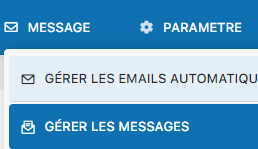
Select "MANAGE MESSAGES"
Click the option MANAGE MESSAGES to access the management section.
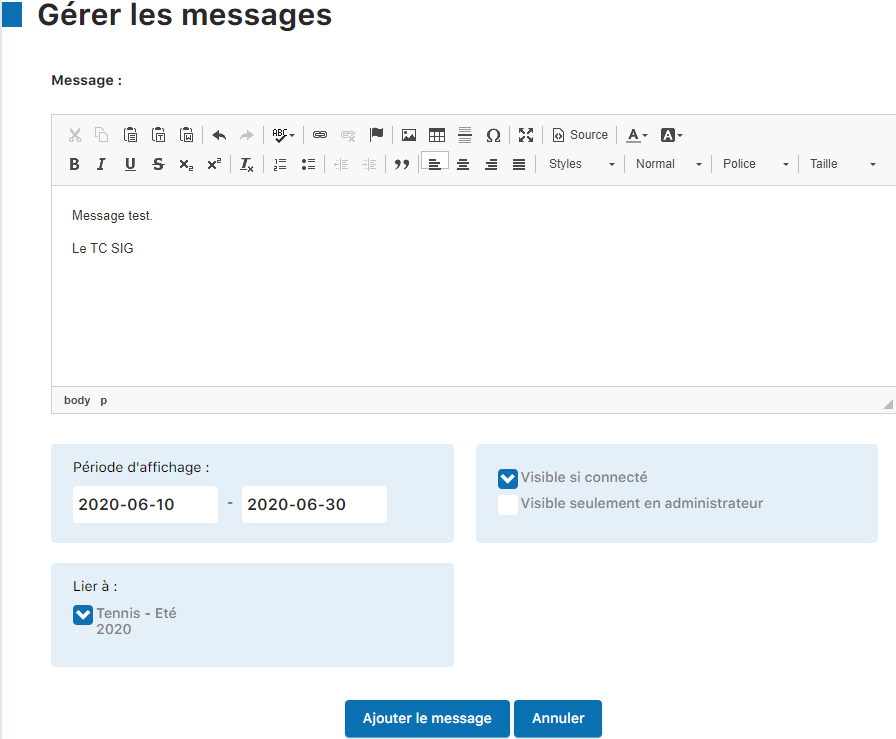
Fill in the fields and activate
Complete your message's fields (title, content, date, etc.), then click "Add message" to activate the display immediately.
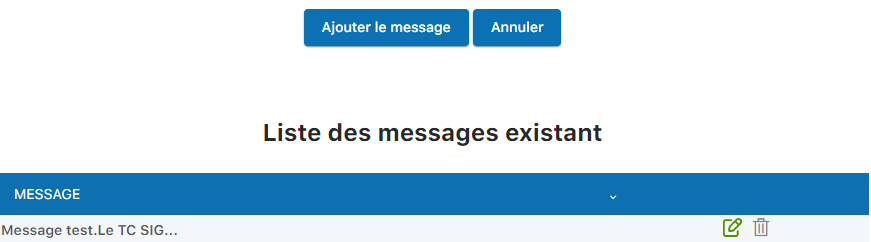
Delete a message
To remove an existing message, simply click the basket or trash icon next to the message you want to delete.
Key points
- Messages are displayed immediately after activation
- You can have several messages active at the same time
- Deletion is instant and without confirmation
- Ideal for important announcements and real-time information
⚠️ Important
Make sure your messages are clear and concise. Displayed messages are visible to all members, so only communicate relevant, up-to-date information.
Conclusion
Managing displayed messages is simple and effective. Use this feature to keep your members informed in real time of important information. Don't forget to remove outdated messages to keep the interface clean and clear.
Plugin.ch Tutorial — Manage messages and emails